Codetics project · public code

Freelancing deserves better than just another marketplace

Jobetics explores a new way to connect freelancers and companies. Paid jobs, more transparent relationships, a reputation that goes both ways, and the tools to run your business in one place.

iPhone, iPad and Apple Watch · iOS 26 · English, French and Spanish

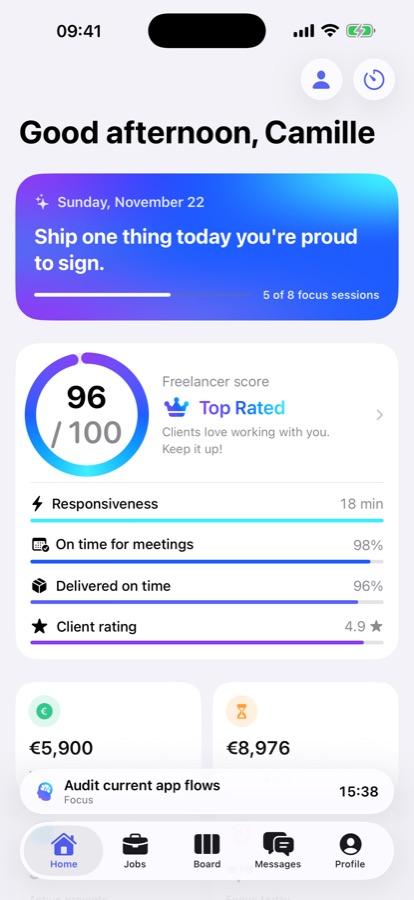
Jobetics home screen on iPhone: the daily message, a freelancer score of 96 out of 100 and its breakdown (responsiveness, punctuality, on-time delivery, client rating).
Apple devices: iPhone, iPad and Apple Watch
3
languages: English, French and Spanish
3
layers of moderation, in the app and then on the server
2
accounts needed to explore it in demo mode
0
The problem

On freelance platforms, the relationship leans one way

The usual model is simple: a company posts a job, freelancers apply, the client compares profiles, and everyone negotiates. It works, but four things often go wrong.

  1. 01

    A relationship reduced to an application

    The freelancer sends a profile and waits. Résumés get compared, rarely two professionals who could work well together.

  2. 02

    Freelancers get rated, clients never do

    A freelancer's profile is rated, reviewed and compared. A client's vague brief, poor communication or late payments leave no trace at all.

  3. 03

    Unpaid work still slips through

    "A quick unpaid test", payment promised outside the platform, an offer too good to be true: faced with dubious proposals, freelancers are often on their own.

  4. 04

    A business split across several tools

    The job is found in one place. Tasks, quotes, invoices and bookkeeping live somewhere else, in tools that don't talk to each other.

The Jobetics approach

A fairer relationship, written into the product's rules

Good intentions aren't enough. In Jobetics, what protects both sides is enforced by the server, not just hidden in the interface.

  • 01

    Every job is paid

    A job without pay can't be posted. The rule is checked three times: by the form, by the database's security rules and by automatic moderation.

  • 02

    Reputation goes both ways

    Freelancers rate employers too: how clear the brief was, communication and payment. A good client shows, and so does a difficult one.

  • 03

    Anonymous by default

    At first, each side sees the other's skills and reputation. No name, no email, no phone number, no photo.

  • 04

    Contact details by mutual consent

    Contact details only appear once both people accept the exchange. Until then, the server blocks email addresses and hides phone numbers slipped into messages.

  • 05

    AI-assisted moderation

    AI flags spam, scams, unpaid work, requests to pay off-platform, harassment, phishing and discriminatory content.

  • 06

    Business tools in the same place

    Task board, calendar, quotes, invoices, bookkeeping and portfolio: once the job is found, it's managed in the same app.

The app

A tour of Jobetics, screen by screen

Every capture comes from the app itself, running on its demo data. The people, companies and amounts are fictional.

01

Paid jobs, rated employers

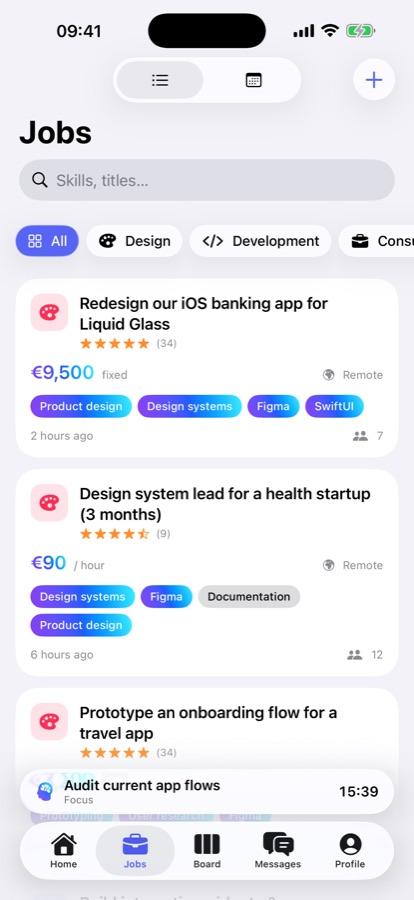
The job list puts what matters first: the pay, fixed or hourly, the skills needed and the employer's rating. Any company can post a job. Only registered freelancers can browse jobs and apply.

  • The pay shown on every job
  • The employer's rating: brief, communication, payment
  • Reporting a suspicious offer
Job list in Jobetics on iPhone: each job shows its pay (€9,500 fixed, €90 an hour), the employer's rating and the skills needed.
Jobs matched to the freelancer, every one of them paid
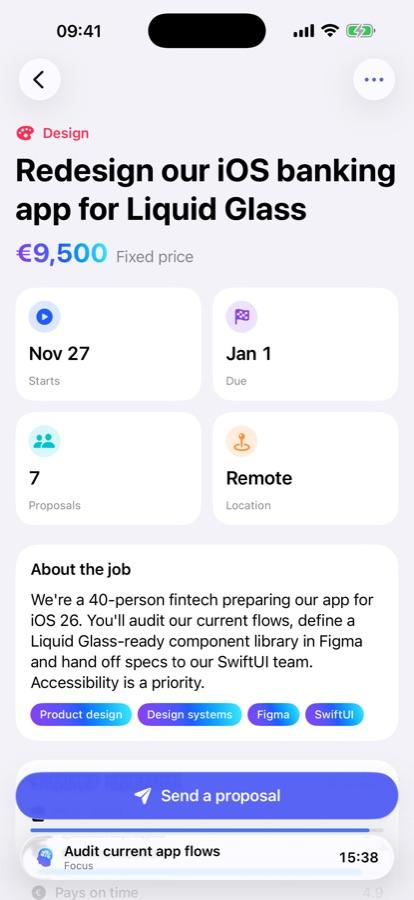
Details of a design job on iPhone: fixed price of €9,500, starting November 27, due January 1, 7 proposals, remote, and the button to send a proposal.
A job's details: fixed price, dates, location and number of proposals
02

Anonymity first, trust next

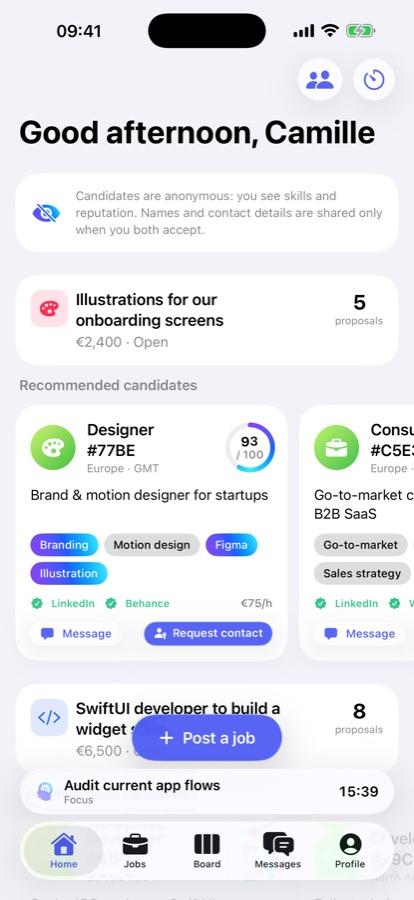
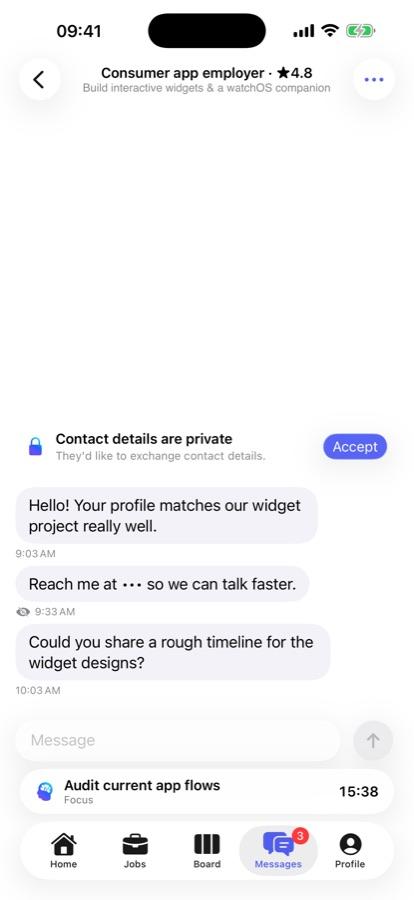
On the company side, recommended candidates appear under a pseudonym, with their skills, their score and their verified profiles. In messages, contact details stay locked until both people agree to exchange them.

It's not just a mask on the screen: the server blocks email addresses and hides phone numbers, even when someone tries to slip them into a message.

  • Real-time messages and notifications
  • Blocking and reporting someone
  • Every link checked before it opens
Jobetics hiring screen on iPhone: a note explains that candidates are anonymous, then the card of an anonymous designer with a score of 93 out of 100, skills, verified LinkedIn and Behance profiles and a button to request contact.
Anonymous candidates: skills, score and verified profiles, with no name or photo
Conversation in Jobetics on iPhone: a banner says contact details are private and offers to accept the exchange, and the contact detail slipped into a message is hidden.
A private conversation: the contact exchange waits for both sides to agree
Security

AI that protects, not AI that chats

In Jobetics, AI isn't a chat assistant. It's a security component that reads job posts and messages to keep out what has no place on the platform.

Moderation, in two passes

Gemini, Google's AI model, reviews content a first time from the app, through Firebase AI Logic, protected by App Check so only the genuine app can use it. Then a second time on the server, in Cloud Functions. Whatever gets held goes to a moderation queue, where a person decides.

  • Spam and scams
  • Unpaid work
  • Off-platform payment
  • Harassment
  • Phishing
  • Discriminatory content

Every link checked before it opens

A link in a job post or a message goes through a dedicated check before it opens, inside the app. The server also matches it against Google Safe Browsing's list of dangerous sites.

  • Suspicious domains
  • Look-alikes of well-known sites
  • Deceptive characters (punycode)
  • Shortened links
  • Raw IP addresses
  • Credentials hidden in the address
03

Running the business, not just finding the next job

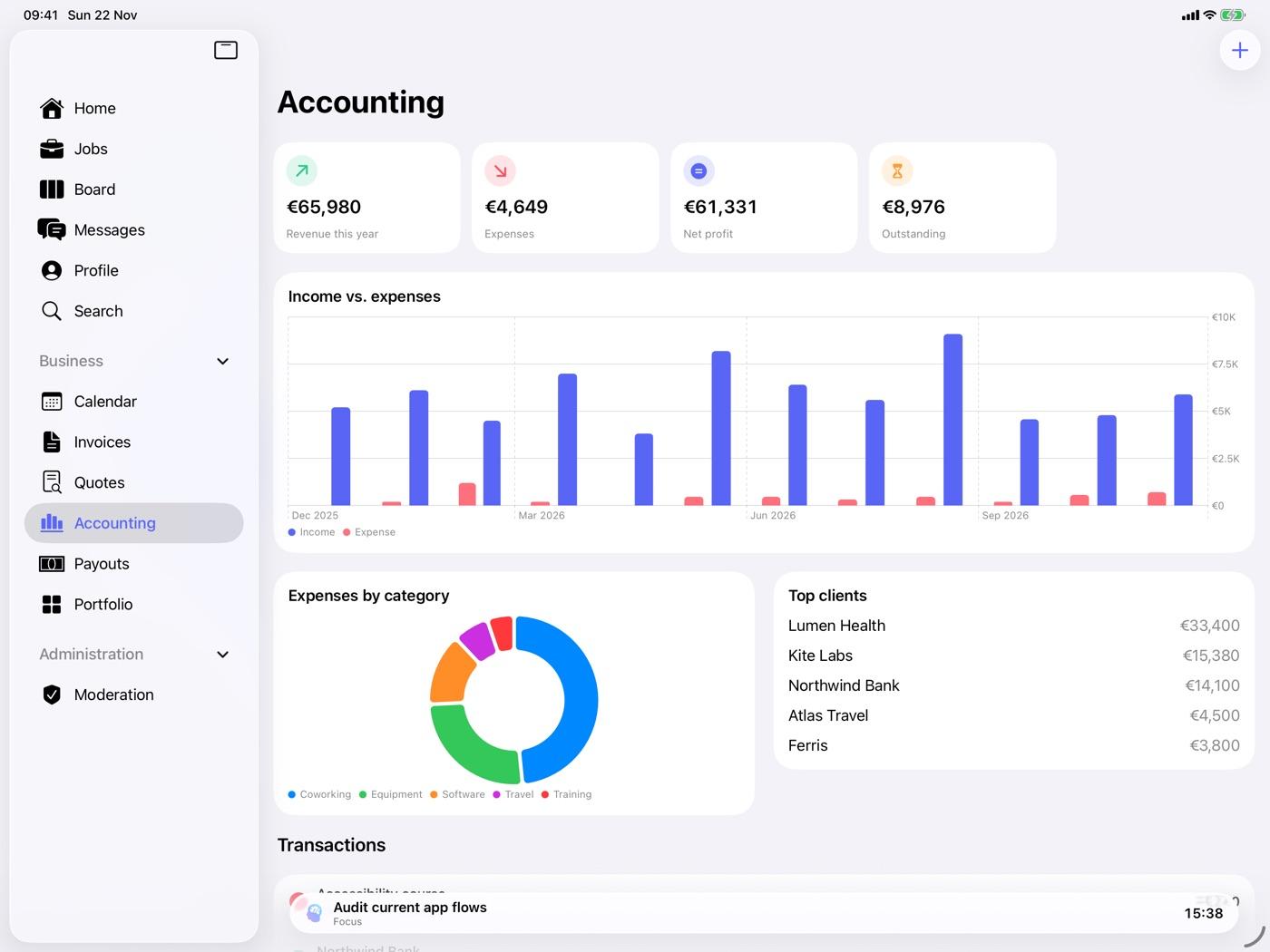
Once the job is signed, the work carries on in Jobetics. Each project has its task board: to do, in progress, in review, done. Quotes become PDF invoices, ready to send. Bookkeeping tracks revenue, expenses, payouts received and how much to set aside for taxes.

This data stays private. It's stored on the device and synced through the user's own iCloud account, never on Jobetics' servers.

  • Calendar of jobs and meetings
  • Quotes, PDF invoices and sending
  • Portfolio with images and files
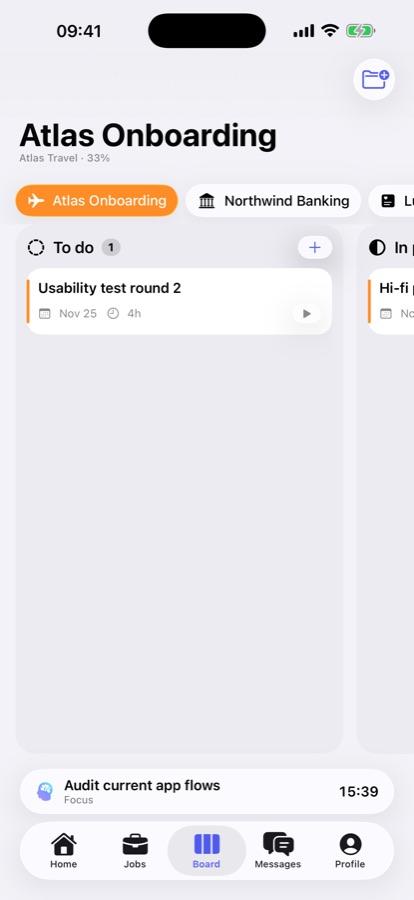
Task board for the "Atlas Onboarding" project on iPhone: the To do column holds the task "Usability test round 2", due November 25, estimated at 4 hours.
A project's board, with each task's due date and estimated time
Jobetics Accounting screen on iPad: €65,980 revenue for the year, €4,649 expenses, €61,331 net profit, €8,976 to collect, a monthly revenue and expenses chart, spending by category and top clients.
Bookkeeping on iPad: revenue, expenses, net profit and top clients
04

Time to focus

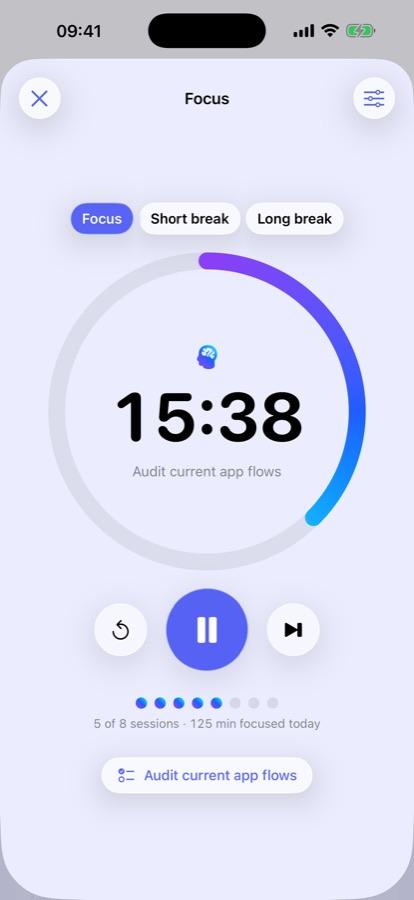
The Pomodoro timer alternates focused work sessions with short breaks, and links to a task on the board. It stays within reach everywhere: on the Lock Screen and in the Dynamic Island, in a widget, in Control Center, on the wrist with Apple Watch, which taps at every step, and by voice with Siri.

  • Live Activity and Dynamic Island
  • Widget and Control Center
  • Apple Watch and Siri
Jobetics focus timer on iPhone: 15:38 left on the task "Audit current app flows", 5 of 8 sessions and 125 minutes of focus today.
The timer, linked to a task, with today's sessions
Built for Apple devices

A native app, at home on every screen

Jobetics is written in Swift with SwiftUI, Apple's own language and tools. In practice, it behaves like Apple's apps: the same gestures, dark mode, the Liquid Glass look of iOS 26. And each device gets the interface that suits it.

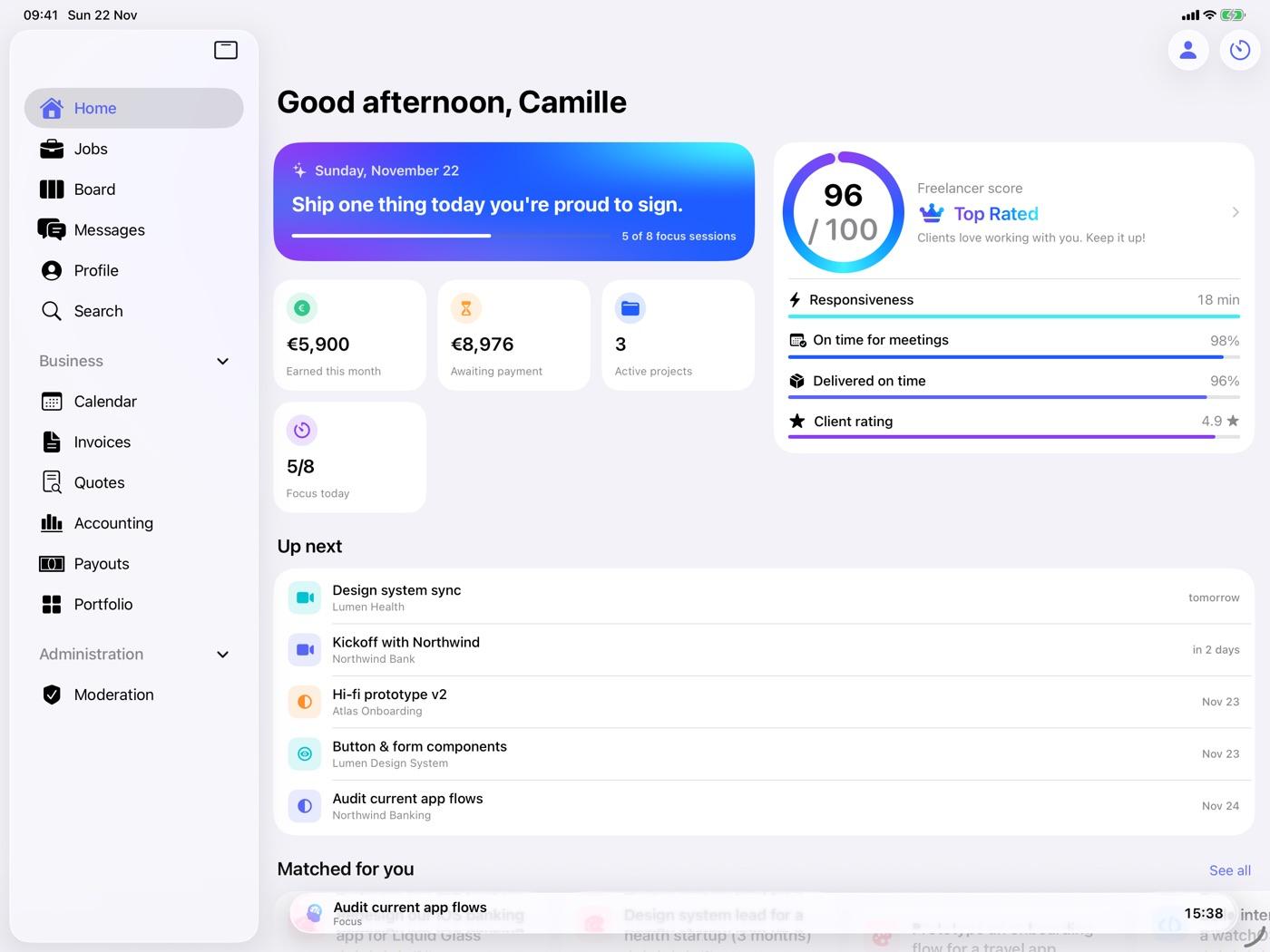
Jobetics home screen on iPad: a sidebar with every section, the daily message, a freelancer score of 96 out of 100, earned and pending amounts, and upcoming meetings.
On iPad, the sidebar opens the whole suite: calendar, invoices, quotes, bookkeeping, payouts and portfolio
  • iPhone

    The essentials, nothing more. Five tabs, home, jobs, board, messages and profile, with the business tools tucked under the profile.

  • iPad

    The full workshop. The sidebar opens the whole business suite, on a screen big enough to really work.

  • Apple Watch and widgets

    The timer, the daily motivation and the score on the wrist. On the Home Screen and Lock Screen, widgets for matched jobs, the timer and motivation.

Under the hood

A clear architecture, from phone to server

Two worlds live side by side. The marketplace is shared by every user and goes through the server. Each freelancer's business belongs to them alone and stays in their iCloud.

In the app

  • Swift and SwiftUI
  • iOS and iPadOS 26
  • watchOS
  • SwiftData and iCloud (CloudKit)
  • WidgetKit and Live Activities
  • App Intents: Siri and Control Center

On the server, with Firebase

  • Authentication: email and Google
  • Cloud Firestore and its security rules
  • Cloud Messaging for notifications
  • Cloud Functions: validation and moderation
  • AI Logic and Gemini
  • App Check

What the public repository holds

The repository holds the app. The production Firebase configuration, security rules and Cloud Functions are kept separately: the public code gives no access to the live project. Without a configuration, the app starts in demo mode, with realistic sample data and no account.

Behind the scenes

AI speeds things up, the engineer decides

Jobetics is also an experiment in how software gets made today. The app was built in a short time, mixing traditional engineering with AI-assisted development, vibe coding included: describing what you want and letting the AI suggest the code.

That doesn't make it an app generated by AI. Some parts were written or sped up by AI. Others come from architecture choices, product design, debugging and checking. That's the real demonstration: the developer's job is changing, not disappearing.

What a developer now needs to know how to do

  1. 01Hand AI the work that suits it
  2. 02Understand the code it suggests, and challenge it
  3. 03Spot wrong assumptions and implementation mistakes
  4. 04Keep the architecture consistent from end to end
  5. 05Make sound technical decisions
  6. 06Fit different pieces into a product that holds together
  7. 07Turn an idea into an app that works

With 21 years of software development behind him, Kevin Vavelin uses AI as one more engineering tool, not as a replacement. Jobetics shows it in practice.

Public code

Code anyone can read

Jobetics' source code is public on GitHub, on purpose. Anyone can see how the app is built, run it in demo mode from Xcode and follow how it evolves: the project keeps moving, in the open.

The licence is still to be decided. Until then, the code can be read, but reusing it isn't covered yet.

github.com/kevinvavelin/JobeticsOpen the repository
Get started

An idea deserves better than a mockup

At Codetics, we design and build software, native apps and business platforms. Jobetics is a concrete example of how we work: experiment, design, build and ship.

  1. 01You describe the problem
  2. 02We talk it through
  3. 03You get a scope and a price in writing
Let's talk about your project
Technical Assessment

Is the problem still unclear?

€390

Fixed price, paid online · VAT not applicable, art. 293 B of the French Tax Code.

The Technical Assessment tells you what's behind it and what the next stage would cost.

See the Technical Assessment